 Alpcell Fusion Tools

T-Slot Extrusions
Alpcell Fusion Tools panel · SOLID → CREATEMakes aluminium T-slot extrusions in the four common sizes, 2020, 2040, 3030 and 3060, with B-type, V-Slot or I-type slots. Make one length on a plane, or select the lines of a sketch and get an extrusion along each one, so a whole frame is built in one go. The Result box shows the slot size, the thread to tap into the ends and the weight.
- 2020, 2040, 3030, 3060
- B-type, V-Slot, I-type
- Full or simple detail
- One on every sketch line
- Weight in the Result
- Remembers your values
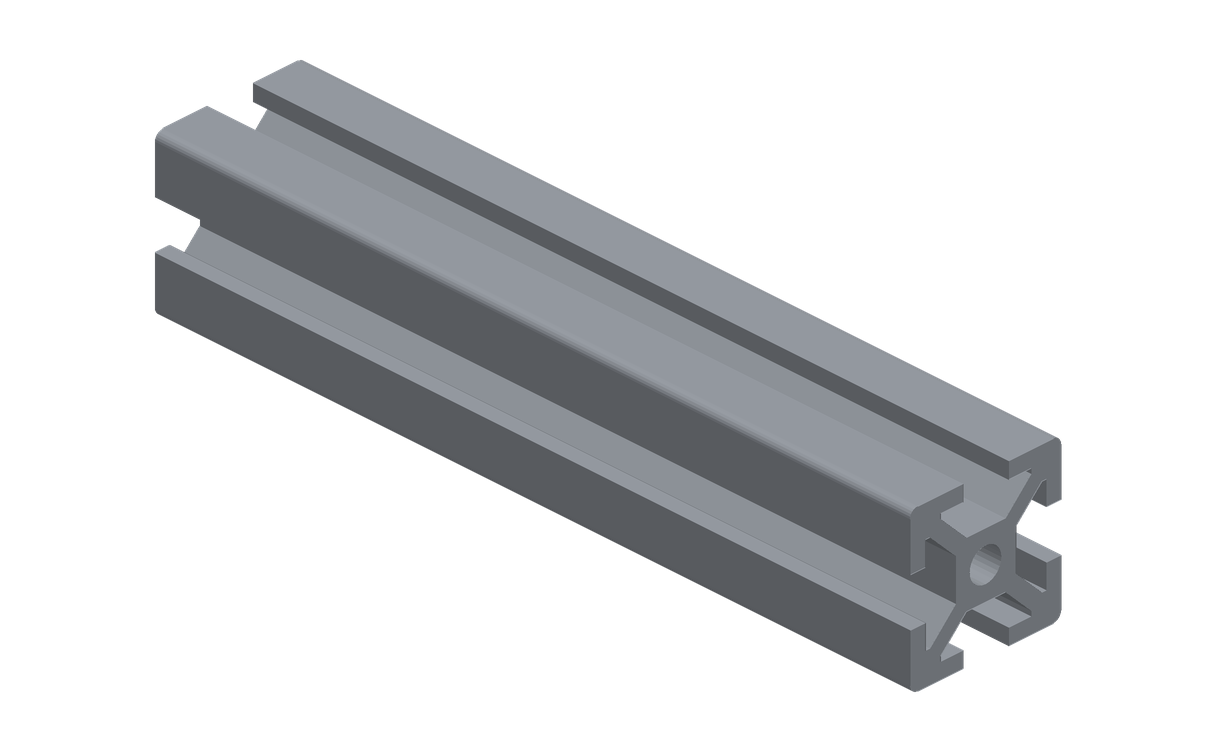
What you get
-
Three slot systems
B-type (slot 6 on 20 mm, slot 8 on 30 mm) is what Misumi, Motedis and most hobby suppliers sell. V-Slot is OpenBuilds' profile with V-shaped grooves for wheels to run on, 20 mm series only. I-type (slot 5 on 20 mm, slot 6 on 30 mm) is the item and Bosch style. The drawing shows the outlines the tool builds for 2020, to scale.
-
Checked against the makers
The profiles follow published figures: a B-type 3030 weighs 0.90 kg/m like Misumi's HFS6-3030, and a V-Slot 2020 has OpenBuilds' 169 mm² cross-section. For I-type, the inside of the channel is an estimate, and the Result box says so.
-
A frame from a sketch
Draw the frame as lines in a sketch, choose Along sketch lines and select them: every line becomes an extrusion as long as the line, centred on it, each in its own component. They all share the same parameters.
-
Full or simple
Full detail builds the real profile with its undercut slots. Simple builds only the outline, plain slots and the bores, which keeps a frame of many extrusions light and quick in Fusion.
-
Edit it later in Fusion
The sketches are fully constrained, and on a plane the slots of one side are cut once and patterned round the profile. Each extrusion gets its own component and one timeline group, for example “2020 B-type 100 mm”.
How to use it
- Start the toolClick T-Slot Extrusion in the Alpcell Fusion Tools panel, or under SOLID → CREATE.
- Choose the profilePick the slot system, size and detail, then a length on a plane or the lines of your sketch. The preview and the Result box update as you go; a problem shows in red, right under the field to change.
- Click OKThe extrusions are added to your design. Change them later through their sketch dimensions, or move them in Fusion's Move dialog.
Settings
The dialog from top to bottom, with what each setting does. The letters refer to the drawing, and to the rows of the Result box.
A B-type 3030 extrusion in full detail, cut square to its length, to scale. The 2020 has no corner holes.
- A Slot width (Result: Slot)
- B Slot depth (Result: Slot)
- C Centre bore
- D Corner holes
- E Size: 30 mm for a 3030
The dialog opens with the values you used last. They are also saved in the design, so each design keeps its own. Reset brings back the defaults and forgets the saved values. The selected lines are never remembered.
The profile family. Choose the one your nuts and brackets are made for: they are not interchangeable. B-type has a 6 mm slot on the 20 mm series and 8 mm on the 30 mm series (Misumi, Motedis and most hobby suppliers). V-Slot is the OpenBuilds profile, whose V-shaped grooves guide wheels; it only comes in the 20 mm series. I-type has a 5 mm slot on 20 mm and 6 mm on 30 mm (item and Bosch style).
The profile size in millimetres: 2020 is 20 × 20 mm, 3030 is 30 × 30 mm. 2040 and 3060 are two square cells side by side along X, with a slot on each cell's face. The tool fills the space between the two cells with solid material, where real profiles have a cavity, so the weight of those two comes out a little high.
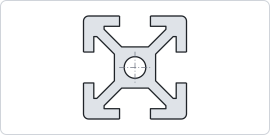
A drawing of the profile you chose, to scale, so you can check it against your supplier's catalogue. It changes with Slot system, Size and Detail, and disappears while the slot system does not come in the chosen size.
Full builds the real profile, with the undercut channels behind the slot openings. Simple builds the outline, plain straight slots and the bores. Choose Simple for frames with many extrusions, where the full profile would slow Fusion down, and Full for close-ups, renders and drawings.
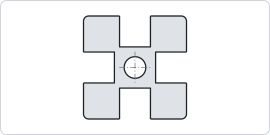
The same B-type 2020 in simple detail, as the dialog shows it.
On plane makes one extrusion of the length you give, standing on an origin plane, which you can then move and turn. Along sketch lines makes one extrusion along each line you select, as long as the line. The rows below change with the choice.
How long the extrusion is, measured along the plane's normal.
Where the extrusion goes, with Place set to On plane. Every creation tool has this group.
The origin plane the extrusion stands on, its cross-section centred on the origin. It grows along the plane's normal, so on XY it stands upright along Z.
Builds the extrusion on the other side of the plane. The distances and angles below keep their meaning.
Three rows in the dialog: how far to move the extrusion along X, Y and Z.
Three rows: how far to turn it about X, then Y, then Z. Like Fusion's Move command, the move is saved as one Move feature named “Placement”, so you can change it later in Fusion's own Move dialog. With all six at 0, no Move feature is added. Turn it 90° about X or Y to lay it down.
These three rows appear right under Place, and Length and the Placement group are hidden.
The sketch lines to run extrusions along, for example the skeleton of a frame drawn through the middle of each member. Each line gets an extrusion centred on it and as long as the line, in its own component named after it (“2020 B-type 500 mm”); all of them go into one timeline group (“2020 B-type × 12”) and share one set of parameters. The profile's top faces the way the sketch faces, so a 2040 or 3060 lies flat in the sketch's plane. The selection is not remembered.
Added at both ends of every line; a negative value shortens each extrusion instead. For a frame drawn through the middle of its members, run the tool twice: first the uprights with half the profile size (10 mm for 20 mm profiles), so they reach the outside of the frame, then the horizontal pieces with minus that (−10 mm), so they butt against the uprights.
Turns every profile about its line. Use 90° to stand a 2040 or 3060 on its narrow side.
Facts about the profile you chose, for ordering parts and checking your frame. When a setting has a problem, a red message takes this box's place.
The slot opening at the face, and how deep the slot reaches from the face to the core. The width is the “slot 6” or “slot 8” your T-nuts and brackets are sold for.
The diameter of the hole through the middle of each cell, and the thread it is the tap drill for. Tap the ends to screw on end caps, feet or corner brackets: M5 on the 20 mm series, M8 on B-type 3030 and 3060, M6 on I-type 3030 and 3060.
The four smaller holes near the corners. Only B-type 3030 and 3060 have them, so the row is shown for those only.
How many lines are selected and the length of all the extrusions together, end offsets included: what you need to order. Shown with Place set to Along sketch lines; the value here is an example.
The weight per metre, then the weight of everything the tool makes, in aluminium (2.70 g/cm³). It is worked out from the profile as drawn, so Simple detail, with less taken out, shows more than the real profile weighs.
Shown for I-type in full detail. The slot width, slot depth and core thread are published figures; the lip, channel width and webs are estimates, so check them against your supplier's drawing if they matter.
Opens this page in your browser.
The ⓘ at the lower left also opens this page. OK adds the extrusions; Cancel leaves your design as it was.